
Mini Metro is a paid mobile game from New Zealand studio Dinosaur Polo Club, built around one deceptively hard question: how long can you keep a growing city moving with a handful of lines, trains, and upgrades? On Android and iOS, it keeps the same clean “tube map” look as the desktop version, but the real hook is timing—knowing when to redraw a network, when to stop tweaking it, and when to spend a scarce upgrade to prevent one crowded station from collapsing the whole system. The mobile editions launched on 18 October 2016 and remain actively available in app stores in 2026, which is why you’ll still find fresh guides, discussions, and Daily Challenge runs among players.
At its core, Mini Metro models passenger demand with a simple visual language: each station has a shape, and passengers want to travel to a station of a specific shape. That means you can read pressure at a glance. If circles are piling up at a triangle station, you do not need a spreadsheet—you need a faster path to triangles, or fewer forced transfers. The minimalist art style is not just aesthetic; it is functional, and it helps you make decisions quickly on a phone screen.
The game’s “weeks” act like a metronome. Each week you receive a limited upgrade choice (for example, a new locomotive, carriage capacity, an extra line, tunnels, or an interchange). Because those choices are irreversible in terms of opportunity cost, your job is to identify where the next failure will happen before it happens. In practice, most losses are not caused by a lack of trains overall, but by one station turning into an overloaded transfer point with no spare capacity or alternate route.
Mobile controls encourage a different rhythm from desktop: you can redraw lines quickly, but you also feel the cost of constant intervention. A good network on iOS/Android is often one you can leave alone for long stretches. The best players build “stable geometry” (clear loops, short branches, predictable interchange points) that stays effective even when new stations spawn in awkward places.
Mini Metro rewards early, calm decisions. The moment you notice a station becoming a default interchange, treat it as a risk and react before it becomes critical. Waiting until the overcrowding timer is nearly full forces rushed edits: trains get stranded on the wrong line, a redraw accidentally cuts a key connection, and the network becomes chaotic. The game is fair, but it punishes late responses.
A practical timing rule for mobile play is to schedule your own “maintenance windows”. For example: redraw only right after the weekly upgrade, or only after placing a new line, so you can observe the impact. This avoids the common trap of making three fixes at once and not knowing which one actually helped. Mini Metro’s feedback loop is fast, but you still need a short in-game window to confirm whether passenger flow improved or simply moved the bottleneck elsewhere.
Extreme mode makes this timing pressure explicit: you cannot move what you place later, which turns every action into a commitment. Even if you prefer Normal mode, Extreme is useful as training because it teaches discipline—build with future growth in mind, not just today’s mess. Mobile includes Normal, Endless, Extreme, and Creative, so you can use each mode for a different type of practice.
The simplest reliable pattern is a loop. A loop line that hits several busy stations reduces transfer pressure because passengers can circulate without forcing everyone through one hub. On mobile, loops are also easier to audit visually: you can see instantly whether trains are evenly distributed and whether one segment is doing all the work. Loops are not a cure-all, but they are the best default when you are unsure where demand will spike next.
Branches are powerful but dangerous. A long branch creates “dead time” where a train travels far without picking up many passengers, and the terminal station can overflow because service frequency is too low. If you must branch, keep branches short and consider giving the busiest branch its own dedicated line rather than hanging it off the main trunk. In other words: branches should solve a local problem, not become a second city attached to one overworked line.
Interchanges should be treated like expensive infrastructure, not a quick patch. They increase capacity at a station, but they also encourage you to funnel even more routes through it. A strong interchange is one that sits where lines already cross naturally and where there is space to add capacity later. A weak interchange is the one you place only because you panicked, and it becomes crowded again two minutes later.
Upgrade choice is where the game becomes strategy rather than sketching. If your trains are constantly full, adding carriages can be more efficient than adding locomotives, because it increases throughput without increasing congestion on the tracks. If your trains are half empty but stations still overflow, the issue is routing and transfers, not raw capacity.
Tunnels are often underestimated in mobile play because they feel situational. In reality, tunnels are a way to reduce route length and avoid awkward crossings, which improves frequency and prevents a line from becoming a long, slow snake. If a river forces a single bridge-like connection that many passengers depend on, a tunnel upgrade can be the difference between a controllable network and a permanent choke point.
Extra lines are best when they let you separate incompatible demands. For example, if one region is mostly circles and squares while another is triangles and stars, splitting them reduces transfers and keeps trains focused. Extra lines used merely to “add more connections everywhere” usually backfire, because they increase complexity faster than they increase service quality.
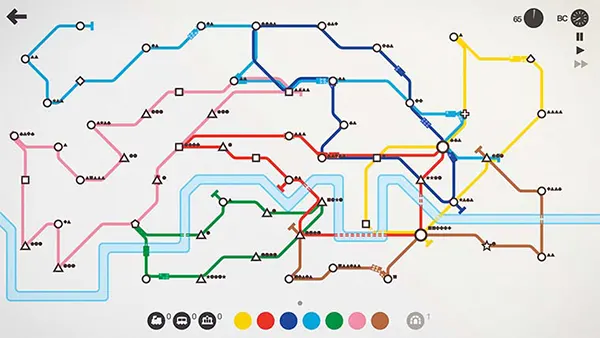
Mini Metro on Android and iOS offers multiple ways to play the same system. Normal mode is the classic scored run where one overcrowded station ends the game. Endless removes the loss condition, so you can experiment with layouts without the stress of a timer. Creative gives you freedom to build and edit more openly, which is ideal when you want to test theories rather than chase a high score.
Daily Challenge adds a competitive routine without requiring huge time investment: one fixed scenario per day, comparable results, and a reason to refine technique rather than relying on lucky station spawns. It is also a great way to learn new cities quickly because it pushes you into maps you might not choose yourself.
Accessibility on mobile is not an afterthought. Colourblind and night modes matter in a game where colour is functional information (line identity, route tracing, and quick mental parsing). If you play on a commute or in low light, night mode is not just cosmetic—it reduces strain, which indirectly improves decision-making.
First, watch transfers, not trains. A station that receives passengers from multiple shapes and multiple lines is a transfer magnet, and transfer magnets are where games are lost. Reduce forced transfers by connecting key shapes directly, or by building a loop that allows multiple paths between busy regions. If one station must be a hub, invest in capacity early and give it redundancy—an alternate path that bypasses it.
Second, simplify your map before you optimise it. On a phone screen, clarity is performance. A network with fewer, more purposeful lines is easier to monitor, which means you catch problems earlier. If you cannot explain what a line is “for” in one sentence (for example, “circle–square loop in the west”), it is probably doing too many jobs and will eventually create a bottleneck.
Third, treat redraws as surgery, not constant tweaking. Make one change, then observe. If you need to fix multiple things, prioritise in this order: (1) a station close to overflowing, (2) a transfer hub where timers are climbing, (3) a line that is too long to serve reliably, (4) minor inefficiencies like a slightly awkward bend. The game’s rules are consistent; your advantage comes from consistent triage.